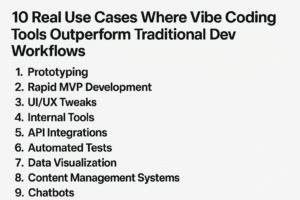
So, we’re talking about AI copilots versus this new thing called ‘vibe coding’. It sounds a bit like comparing a super-smart assistant to just, well, going with the flow. The big question is which one actually gets stuff done faster. Can you really just ‘vibe’ your way to a finished product, or do you need that more structured AI help? Let’s break down what these terms mean and see how they stack up when it comes to shipping code.
Table of Contents
- Understanding Vibe Coding and AI Copilots
- Key Tools in the AI Copilots vs Vibe Coding Debate
- Use Cases and Applications of Vibe Coding
- The Pitfalls of Vibe Coding: Risks and Limitations
- AI Copilots vs Vibe Coding: Impact on Software Development
- Distinguishing Vibe Coding from AI-Assisted Engineering
- The Future of Coding: Agentic Modes and Beyond
- Navigating the AI Coding Landscape
- So, Who Wins the Speed Race?
- Frequently Asked Questions
Key Takeaways
- Vibe coding is like letting an AI take the reins on code generation, focusing on the big picture rather than the code itself. AI copilots, on the other hand, are more like enhanced assistants that help developers write code more efficiently.
- Tools like GitHub Copilot, Cursor Chat, and command-line agents are often used for vibe coding, blurring the lines with AI-assisted development.
- While vibe coding can be great for quick prototypes and brainstorming, it often falls short for production-ready software due to potential security issues, bugs, and performance problems if not carefully reviewed.
- AI copilots accelerate development cycles by providing suggestions and automating tasks, but human oversight remains critical for ensuring code quality, security, and reliability.
- The future likely involves a blend of AI assistance and human expertise, with skilled architects and product engineers who can guide AI tools becoming even more important.
Understanding Vibe Coding and AI Copilots
It feels like every other day there’s a new buzzword in the tech world, and lately, "vibe coding" is definitely one of them. You might have heard it thrown around, maybe even seen it on social media. But what exactly is it, and how does it stack up against the more established idea of AI copilot tools? It’s not as simple as just picking one over the other; there’s a lot of overlap and nuance.
Defining Vibe Coding: Letting the AI Take the Wheel
So, what’s the deal with vibe coding? Think of it as handing over the reins to an AI. You describe what you want the software to do, maybe in plain English, and the AI just… writes the code. The idea is that you’re not really sweating the syntax or the nitty-gritty details. You’re more focused on the overall goal, the "vibe" of the application. It’s like telling a taxi driver where you want to go, and then just relaxing in the back seat while they handle the driving. Some folks, like Andrej Karpathy, have described it as a way to "forget that the code even exists." It’s a pretty wild concept, especially for those of us who have spent years wrestling with compilers and debugging obscure errors. The goal here is speed and a kind of creative freedom, letting the AI handle the heavy lifting.

AI Copilots: The Evolution of Coding Assistance
AI copilot tools, on the other hand, are a bit more like a helpful assistant sitting next to you. Tools like GitHub Copilot or Claude Code are designed to work with you. They suggest code snippets, complete lines, and can even generate entire functions based on comments or context. You’re still very much in the driver’s seat, but you’ve got a co-pilot who can anticipate your next move and offer suggestions. It’s less about handing over control and more about augmenting your own abilities. They’re trained on vast amounts of code, so they can often predict what you’re trying to do, saving you time on repetitive tasks. It’s an evolution from simple autocomplete to something much more sophisticated, aiming to make developers more productive without taking over completely. This approach is about making the coding process smoother and faster, but with a human still firmly in charge of the direction.

The Blurry Line Between Vibe Coding and AI-Assisted Development
Here’s where things get interesting: the line between these two approaches isn’t always clear. If you’re using an AI copilot and it’s generating most of the code, and you’re just approving it or making minor tweaks, are you vibe coding? Or is it still AI-assisted development? It really depends on how much control you’re willing to give up. Some developers might try to strictly adhere to the "don’t look at the code" rule of vibe coding, but for many engineers, it’s hard to completely ignore what the AI is doing. You might find yourself intervening, steering the AI, or correcting its output. It’s more of a spectrum than a strict dichotomy. For instance, you might use an AI to rapidly prototype an idea, which feels a lot like vibe coding, but then you’ll likely need to go back and refine that code yourself to make it production-ready. The key difference often comes down to intent and oversight. Are you aiming to build something quickly without deep code review, or are you using AI as a tool to enhance your own disciplined development process? Understanding this spectrum is key to figuring out which approach best suits your project’s needs. For example, using tools like Lovable AI can blur these lines further, as it aims to translate natural language into functional applications with minimal developer intervention.
Key Tools in the AI Copilots vs Vibe Coding Debate
When we talk about AI in coding, it’s easy to get lost in the buzzwords. But let’s break down some of the actual tools people are using, whether they’re trying to "vibe code" or just get some help from an AI copilot. It’s not always a clear line, and many tools can do both.
Popular AI Copilot Tools for Developers
Lots of developers are already using tools that feel like copilot assistance, even if they aren’t strictly "vibe coding." These are the ones that help you write code faster, suggest completions, and sometimes even generate whole functions. Think of them as really smart pair programmers.
- GitHub Copilot: This is probably the most well-known. It integrates right into your IDE (like VS Code, JetBrains, etc.) and offers suggestions as you type. It’s got an "agent mode" too, which leans more into the "vibe coding" side of things.
- Cursor Chat (formerly Compose): This tool is built into the Cursor IDE and lets you chat with your code, asking it to generate, explain, or refactor. It’s pretty slick for getting quick answers.
- Cody (from Sourcegraph): Cody aims to understand your entire codebase, not just the file you’re working on. This means its suggestions can be more context-aware, which is a big deal for larger projects.
- Tabnine: This one’s been around for a while, even before GitHub Copilot. It’s another strong contender for code completion and generation, supporting a wide range of IDEs.
Command-Line Agents: A New Frontier for Vibe Coding
Sometimes, you don’t even need a full IDE. For pure "vibe coding," where you’re letting the AI take the reins without much direct code editing, command-line tools are becoming really popular. They can be super efficient for certain tasks.
- Claude Code (by Anthropic): People are really liking this one. It runs in your terminal and can interact directly with your project files. Some developers are even switching to it from other tools.
- Aider: This is a paid tool that lets you program with an agent right in your terminal. It was popular a year ago and still has a solid user base.
- Amp (by Sourcegraph): Another command-line option that’s gaining attention for its agentic capabilities.
The idea here is that you can get a lot done just by talking to your computer through text commands, without needing to open up a heavy IDE. It feels a bit like magic when it works well, especially for tasks that are repetitive or follow common patterns.
IDE Extensions and Agent Modes: Bridging the Gap
Many of the tools we just talked about have extensions or specific "agent modes" that blur the lines between a simple copilot and a full-on "vibe coding" experience. These modes often allow the AI to take more control, making decisions about code structure or even suggesting architectural approaches. It’s where you might start to feel like you’re truly handing over the steering wheel, but with the option to grab it back if needed. Tools like GitHub Copilot’s agent mode or extensions like Junie for JetBrains IDEs fit into this category, offering a more integrated and sometimes more hands-off approach to AI-assisted development.
Use Cases and Applications of Vibe Coding
Vibe coding, this idea of letting an AI take the reins on code generation, isn’t just a novelty; it’s actually proving useful in a few specific areas. It’s not about replacing developers entirely, but more about speeding up certain parts of the process or making things accessible to more people.
Rapid Prototyping with AI
This is probably where vibe coding really shines. Need to quickly show a client what a new feature might look like? Instead of spending hours building a basic, throwaway version, you can describe it to an AI and get something functional in minutes. It’s great for getting a visual or a working concept out there fast. You can build a rough proof of an idea, show it off, and then decide if it’s worth developing further or just ditching.
Brainstorming and Idea Generation
Sometimes, you have a general idea but aren’t sure how to start coding it. Vibe coding can help here too. You can prompt an AI with a concept, and it might generate code snippets or even a basic structure that sparks new ideas or shows you a path forward. It’s like having a coding partner who can instantly translate your thoughts into potential code, helping you explore different directions without getting bogged down in the initial setup.
Building Better Developer Tools
Think about it: if AI can generate code, it can also help build the tools that developers use every day. This could mean creating custom scripts for repetitive tasks, generating boilerplate code for new projects, or even assisting in the development of new IDE features. The ability to quickly generate code makes the process of creating and improving developer tooling much faster and more iterative. It’s a way to improve the developer experience itself, making the whole ecosystem more efficient. For example, a developer might use vibe coding to quickly build a small utility to automate a specific workflow, which then becomes a valuable tool for their team. This is a great way to see how AI can improve the developer workflow.
The core idea here is that for many common tasks, the building blocks already exist. The skill shifts from writing every line of code to effectively prompting the AI to assemble those blocks in the right order to meet specific needs. It’s less about knowing every syntax detail and more about clear communication of intent.
The Pitfalls of Vibe Coding: Risks and Limitations
While the idea of letting an AI handle the heavy lifting of coding sounds pretty sweet, it’s not all sunshine and rainbows. "Vibe coding," as some call it, where you basically let the AI run with it without much oversight, can lead to some serious headaches down the road. It’s like handing over the keys to your car to someone who’s only ever seen a picture of a steering wheel – exciting, maybe, but probably not the safest way to get where you’re going.
Production Readiness: Why Vibe Coding Falls Short
Let’s be real, most AI-generated code, especially when you’re just prompting and not really checking, isn’t ready for prime time. It might look good on the surface, but under the hood, it can be a mess. Think about it: the AI doesn’t actually understand your project’s long-term goals or the specific nuances of your business. It’s just pattern matching on a massive scale. This means you can end up with code that’s:
- Buggy: Small errors that a human developer would catch instantly can get buried deep.
- Incompatible: It might not play nicely with your existing systems or future updates.
- Hard to maintain: If you don’t know how the AI arrived at a solution, fixing or changing it later becomes a nightmare.
This lack of built-in quality control is a big reason why many folks suggest that AI-generated code needs a thorough human review before it ever sees the light of day in a production environment. It’s a risk to push code from the AI to production, without careful review. You can find more on the risks of this approach at [4b33].
Security Vulnerabilities in AI-Generated Code
This is a scary one. AI models are trained on vast amounts of code, including code that might have security flaws. If you’re not carefully reviewing the output, you could be inadvertently introducing vulnerabilities into your application. Imagine the AI spitting out code that uses an outdated encryption method or has a common SQL injection weakness – all because it learned from examples that contained those issues. It’s a bit like inviting a wolf into the sheep pen, hoping it’s just there for a friendly chat.
The temptation to just accept the AI’s output without digging in is strong, especially when you’re trying to move fast. But that’s exactly when these hidden security holes are most likely to be missed.
Performance and Cost Implications of Unreviewed Code
Beyond bugs and security, there’s the performance angle. AI might generate code that works, but it might not be the most efficient way to do things. This can lead to:
- Slower applications: Users get frustrated, and your product suffers.
- Increased infrastructure costs: Inefficient code often means you need more powerful (and expensive) servers to run it.
- Unexpected resource usage: The AI might not be mindful of memory leaks or excessive CPU cycles.
So, while
AI Copilots vs Vibe Coding: Impact on Software Development
When we talk about how AI is changing software development, it’s easy to get caught up in the hype. But let’s get real about what these tools actually do for our day-to-day work. AI copilots and the whole "vibe coding" movement are definitely speeding things up, but they also bring their own set of challenges.
Accelerating Development Cycles
One of the biggest draws of AI in coding is the sheer speed. Instead of typing out every line, you can describe what you want, and the AI spits out code. This is fantastic for getting ideas off the ground quickly. Think about building a prototype or testing a new feature; AI can churn out the basic structure in minutes, not hours or days. This means teams can iterate much faster, getting feedback and making changes before they’ve sunk too much time into a particular direction. It’s like having a super-fast junior developer who never sleeps.
- Rapid Prototyping: Quickly generate functional mockups and proof-of-concepts.
- Feature Development: Speed up the creation of new features by letting AI handle boilerplate code.
- Bug Fixing: AI can often suggest fixes for common errors, reducing debugging time.
The Role of Human Oversight in AI Coding
Now, here’s the catch. Just because AI can write code doesn’t mean it always writes good code. This is where the human element becomes super important. If you’re just "vibing" and accepting whatever the AI gives you without looking, you’re asking for trouble. Code needs to be reviewed, tested, and understood. Without careful human oversight, you risk introducing security flaws, performance issues, or just plain buggy code that will cost you more to fix later. It’s like letting a self-driving car take you somewhere new – you still need to pay attention to the map and be ready to grab the wheel.
Relying too heavily on AI without understanding the output can lead to a buildup of technical debt and make future maintenance a nightmare. It’s a trade-off between speed now and stability later.
Shifting Skill Demands for Software Engineers
So, what does this mean for us developers? Our jobs aren’t disappearing, but they are changing. Instead of just writing code, we’re becoming more like architects and reviewers. The skills that are becoming more valuable are things like:
- System Design: Understanding how different pieces of code fit together.
- Critical Evaluation: Being able to spot errors and inefficiencies in AI-generated code.
- Prompt Engineering: Knowing how to ask the AI for exactly what you need.
- Domain Knowledge: Deep understanding of the business problem you’re trying to solve.
It’s less about the syntax of a specific language and more about the bigger picture and the quality of the final product. Tools like GitHub Copilot are changing how we approach coding tasks, and it’s important to adapt to these shifts to stay effective. Learning to work with AI, rather than just letting it do everything, is the key to shipping better products faster. You can find more about how these tools integrate into development workflows on pages like this one.
Distinguishing Vibe Coding from AI-Assisted Engineering
It’s easy to get these two terms mixed up, but there’s a real difference between just letting an AI run wild with your project and actually using AI to help you build things better. Think of it like this: "vibe coding" is like telling a taxi driver where you want to go and then just zoning out, trusting they’ll get you there. AI-assisted engineering, on the other hand, is like being in the passenger seat, giving directions, and occasionally checking the GPS to make sure you’re on the right track. Both use AI, but the level of involvement and the expected outcome are pretty different.
Goals and Expectations of Each Approach
When people talk about "vibe coding," the main idea is speed and minimal effort. You’re essentially handing over the reins to the AI, hoping it can generate functional code based on a general idea or a few prompts. The expectation is often a working prototype or a quick solution for a low-stakes project. It’s about getting something built fast, without getting bogged down in the details of the code itself. You’re not necessarily aiming for perfect, production-ready code; you’re aiming for a result that matches the "vibe" of what you wanted.
AI-assisted engineering, however, has a different goal. It’s about augmenting a developer’s skills, not replacing them. The expectation here is to improve the quality, efficiency, and reliability of the software development process. Developers using AI assistance are still actively involved, guiding the AI, reviewing its suggestions, and making informed decisions. This approach aims for code that is not only functional but also maintainable, secure, and performant, suitable for real-world applications. It’s about building better software, faster, with AI as a powerful tool in the developer’s toolkit, not the sole creator. You can find tools that help with this process on GitHub Copilot.
The Spectrum of AI Integration in Development
It’s not really an either/or situation. AI integration in software development exists on a spectrum. On one end, you have minimal AI use, like using an AI tool for spell-checking code comments. On the other end, you have full "vibe coding," where the AI generates almost everything with little to no human oversight. Most of us probably fall somewhere in the middle.
Here’s a rough idea of where different approaches might sit:
- Minimal AI Use: Auto-completion suggestions, basic code formatting.
- AI-Assisted Coding: AI suggests code snippets, helps refactor, finds bugs, but the developer is in control and reviews everything.
- AI-Driven Development (Vibe Coding): AI generates large chunks of code or entire features based on high-level prompts, with the human acting more as a supervisor or validator.
When AI Assistance Becomes AI Dominance
The line can get blurry, and it’s important to recognize when AI assistance starts to take over too much. If you find yourself accepting AI-generated code without understanding it, or if the AI is making critical architectural decisions without your input, that’s when AI assistance might be tipping into AI dominance. This can lead to several problems:
Relying too heavily on AI without proper review can introduce subtle bugs, security flaws, or performance issues that are hard to catch later. It’s like letting someone else drive your car everywhere – you might get to your destination, but you might not know how to fix it if it breaks down.
This shift from assistance to dominance is often marked by a decrease in the developer’s active engagement with the code itself. Instead of actively coding and problem-solving, the developer becomes a passive recipient of AI output. This can stunt skill growth and lead to a codebase that is difficult for humans to manage in the long run.
The Future of Coding: Agentic Modes and Beyond
The way we build software is changing, and it’s happening fast. We’re seeing new ways of working emerge, like "agentic modes" where AI tools can take on more complex tasks with less direct human input. Think of it like having a really smart assistant who can not only suggest code but also figure out how to implement features based on your high-level goals. This isn’t just about faster typing; it’s about a different way of thinking about development.
What does this mean for the future? Well, it’s not like developers will be out of a job. Far from it. Instead, the skills that are most valuable might shift. People who can really understand the big picture, design systems, and know what makes a good product will probably be even more important. They’ll be the ones guiding the AI, making sure it’s building the right thing and building it well.
Here’s a look at how these agentic modes might change things:
- More Focus on Architecture: Instead of writing every line of code, developers might spend more time designing the overall structure of applications.
- Product Vision Becomes Key: Understanding user needs and business goals will be paramount. The AI can build, but humans need to decide what to build.
- AI as a Collaborator: Think of AI not just as a code generator, but as a partner that can help brainstorm solutions and explore different approaches.
It’s a bit like the difference between being a bricklayer and being an architect. Both are important, but the architect has a different kind of responsibility and a broader view. As AI gets better at the ‘bricklaying’ part, the ‘architect’ role becomes even more critical.
The rise of agentic AI in coding doesn’t mean the end of human developers. Instead, it signals a shift towards roles that require strategic thinking, system design, and a deep understanding of product goals. The human element remains central to guiding and validating the AI’s output, ensuring that the final product is not just functional, but also aligned with user needs and business objectives.
Navigating the AI Coding Landscape
So, you’ve heard about "vibe coding" and AI copilots, and you’re wondering how to actually use these things without, you know, messing everything up. It’s not as simple as just letting the AI do whatever it wants, especially if you actually need to ship something that works and doesn’t have a million security holes. Think of it like this: you wouldn’t just hand over the keys to your car and expect it to get you to your destination perfectly, right? You’d still want to keep an eye on the road, maybe adjust the radio, and definitely be ready to hit the brakes.
Choosing the Right AI Tool for Your Project
Picking the right AI tool really depends on what you’re trying to build. Are you just messing around with a new idea, or are you working on something that needs to be solid and reliable? For quick prototypes or exploring concepts, tools that let you "vibe code" might be fine. But if you’re building something for real, you’ll want something more controlled, like an AI assistant that integrates directly into your workflow. It’s about matching the tool to the job.
Here’s a quick look at some options:
| Tool Type | Best For | Potential Downsides |
|---|---|---|
| Vibe Coding Agents | Rapid prototyping, idea exploration | Production readiness, security risks, code opacity |
| AI Copilots | Code completion, boilerplate, refactoring | Can still generate incorrect or insecure code |
| IDE Extensions | Integrated assistance, context-aware suggestions | Learning curve, potential performance impact |
Learning from AI-Generated Code
This is a big one. Don’t just accept code blindly. Even if you’re leaning towards "vibe coding," you still need to understand what the AI is spitting out. Treat AI-generated code like code written by a junior developer you’re mentoring. Read it. Understand it. Ask yourself if it makes sense. This is how you catch bugs, security flaws, and generally make sure the code is actually doing what you want it to do. It’s also a great way to learn new patterns or techniques the AI might be using. You can find some good advice on using these tools effectively in a developer’s perspective.
The temptation to just "accept all" is strong, but resisting it is key to actually building quality software. Think of the AI as a super-powered pair programmer, not a replacement for your own brain.
The Importance of Human Expertise in Software Delivery
Ultimately, AI is a tool, not a magic wand. The real skill comes in knowing how and when to use it. Experienced engineers who understand system design, security, and the overall product vision are still incredibly important. They’re the ones who can guide the AI, review its output, and make sure the final product is robust and meets user needs. AI can speed things up, but human judgment is what ensures quality and reliability in the long run. It’s about augmenting your abilities, not replacing them entirely.
So, Who Wins the Speed Race?
Ultimately, both AI copilots and vibe coding platforms can speed up development, but they serve different purposes. Vibe coding, where you let the AI take the wheel with minimal oversight, is fantastic for rapid prototyping and exploring ideas quickly. Think of it as a super-fast way to get a rough draft. However, for shipping polished, production-ready software, especially anything complex or requiring high reliability, human oversight is still key. Experienced developers using AI as a copilot, guiding it and reviewing its output, are likely to hit that sweet spot of speed and quality. It’s not about replacing developers, but about giving them powerful tools to build better, faster, but with that essential human touch for the final polish.
Frequently Asked Questions
What exactly is ‘vibe coding’?
Think of “vibe coding” as letting an AI do most of the coding work. You give it a general idea or “vibe” of what you want, and the AI writes the code. It’s like telling a friend to build something for you based on a feeling, rather than giving them exact instructions.
How is ‘vibe coding’ different from using AI copilots?
AI copilots are tools that help you code, like a smart assistant. They suggest code, help you find mistakes, and can even write whole sections of code for you. “Vibe coding” is a way of using these tools where you let the AI take the lead more, focusing on the big picture instead of the small details of writing code.
What tools can I use for ‘vibe coding’?
Tools like GitHub Copilot, Cursor, and even general AI chatbots like ChatGPT or Claude can be used for vibe coding. Many coding programs (IDEs) have special features, sometimes called “agent modes,” that let you use AI in this way. There are also tools that work directly in your computer’s command line.
What are some good uses for ‘vibe coding’?
Vibe coding is great for quickly making a first version of an idea (prototyping), coming up with new ideas, and even helping to create better tools for other developers. It’s a fast way to see if an idea can work.
What are the dangers of ‘vibe coding’?
The biggest risk is that the code the AI writes might not be ready for real-world use. It could have hidden mistakes, security problems, or not work as fast as it should. It’s super important to have a human check the AI’s code carefully before using it for important projects.
How do AI copilots and ‘vibe coding’ change how we build software?
AI copilots can make coding much faster. But, it’s still crucial for humans to guide the AI and check its work. The skills needed for software engineers are changing; people who can design systems and understand the big picture will be even more valuable.
What’s the difference between ‘vibe coding’ and ‘AI-assisted engineering’?
While vibe coding is about letting the AI do most of the work, AI-assisted engineering is more about using AI as a tool to help humans code better. It’s a spectrum, and sometimes the line between them can be unclear, especially when engineers who understand code use these tools.
What does the future of coding look like with AI?
The future likely involves more advanced AI that can handle even more complex coding tasks. However, skilled humans who can design software, solve tricky problems, and understand what users really need will always be important. Think of them as the architects and expert builders of the AI era.