Table of Contents
IT management software is the key to running an efficient and secure digital workplace. Whether you’re managing a small business or a large enterprise, this software helps streamline your IT operations, ensuring everything runs like a well-oiled machine.
Quick Answers:
Key Features to Look For:
1. Real-time monitoring
2. Automation and orchestration
3. Scalability
4. Security and compliance management
Top Benefits:
– Improved operational efficiency
– Improved cybersecurity
– Cost savings
In today’s digital era, IT management software is a vital tool for businesses of all sizes. It offers numerous advantages like monitoring systems, automating repetitive tasks, and securing sensitive data. Without it, companies can face operational hiccups, security breaches, and compliance issues.

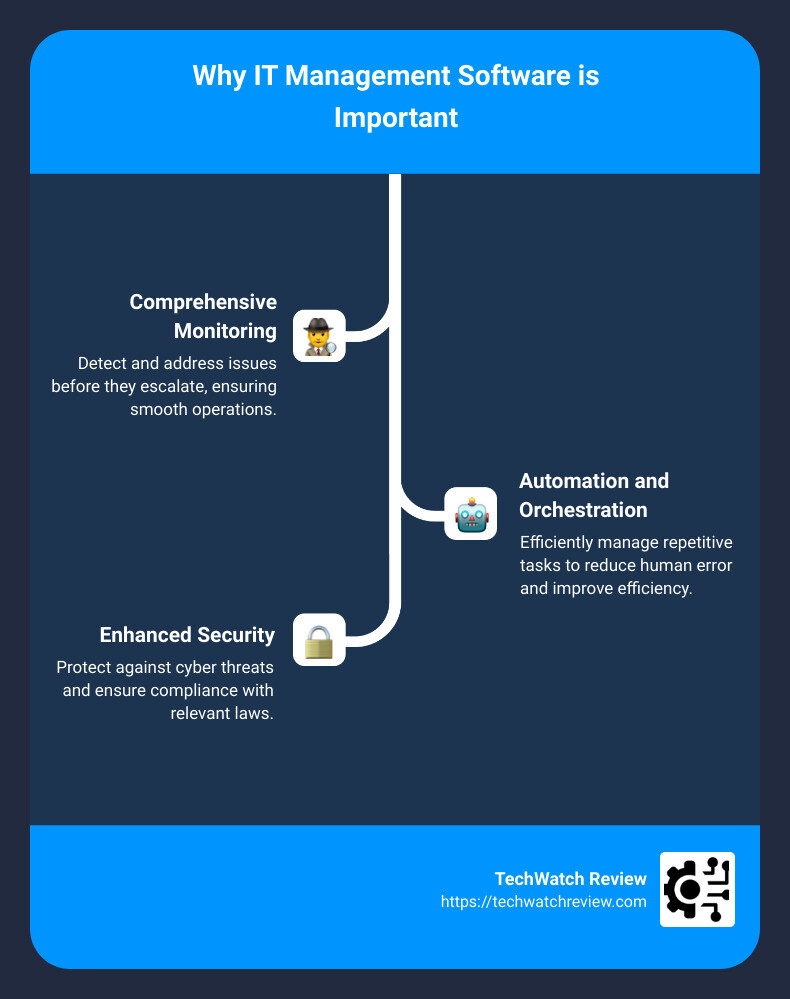
Why is IT management software important?
1. Comprehensive Monitoring: Detect and address issues before they escalate.
2. Automation and Orchestration: Efficiently manage repetitive tasks to reduce human error.
3. Scalability: Easily adapt to growing business needs without disrupting operations.
4. Improved Security: Protect against cyber threats and ensure compliance with relevant laws.
Using the right IT management software also ensures business continuity through features like disaster recovery and backup, along with providing customizable reporting that aids in strategic decision-making.
Learn more about IT management software:
– digital work solutions
– online work order system
What is IT Management Software?
IT management software is a collection of tools and applications designed to help businesses manage their IT infrastructure efficiently. This software centralizes the control and monitoring of IT assets, making it easier for IT departments to maintain system health and security.
Definition
IT management software refers to a suite of applications that provide a unified interface for managing various aspects of an organization’s IT environment. This includes everything from network management and performance analysis to user access controls and security compliance.
Purpose
The primary purpose of IT management software is to streamline IT operations, ensuring that all systems run smoothly and securely. It helps organizations:
- Monitor IT systems: Detect and resolve issues before they escalate.
- Automate tasks: Reduce manual work and minimize human error.
- Ensure security: Protect against cyber threats and ensure compliance with laws and standards.
- Scale operations: Easily add new components to the IT infrastructure without disrupting existing systems.
Key Functionalities
Here are some core functionalities you can expect from top-tier IT management software:
-
Comprehensive Monitoring: Tools like New Relic and NinjaOne offer real-time monitoring of IT systems, helping detect anomalies and performance bottlenecks.
-
Automation and Orchestration: Platforms like Atera and SuperOps automate repetitive tasks such as software updates and backups, ensuring these tasks are completed consistently and efficiently.
-
Scalability: As your business grows, scalable solutions like ManageEngine OpManager allow you to expand your IT capabilities without a hitch.
-
Security and Compliance Management: Solutions such as Malwarebytes focus on protecting your IT environment from cyber threats while ensuring compliance with industry standards.
-
Disaster Recovery and Backup: Regular backups and disaster recovery plans are crucial. For example, Rippling offers robust backup solutions to safeguard your data.
-
User Access Management: Tools like ManageEngine ADManager Plus help manage user permissions and prevent unauthorized access to sensitive data.
-
Performance Analysis: By analyzing system performance, tools like Syncro help identify areas for improvement, enhancing overall productivity.
-
Cloud Management: With many businesses moving to the cloud, platforms like Josys provide essential tools for managing cloud deployments, optimizing costs, and ensuring security.
-
Network Management: Ensuring a reliable and secure network is crucial. Tools like ManageEngine RMM Central help maintain network performance and security.
-
Customizable Reporting: Customizable reports from tools like Zoho Projects allow organizations to focus on key metrics, aiding in strategic decision-making.
By leveraging these features, businesses can ensure their IT operations are efficient, secure, and scalable, supporting both current needs and future growth.
Top 10 IT Management Software of 2026
Choosing the right IT management software can be a game-changer for your organization. Here’s a rundown of the top 10 IT management tools that stood out in 2026.
1. Freshservice
Freshservice by Freshworks is an all-in-one IT management solution. It excels in incident management, asset management, and change management. Its integrations with Slack and Microsoft Teams make it a versatile choice for modern workplaces.
- Price: Starts at $25/user/month
- Best For: Comprehensive IT service management
- Quote: “Freshservice allows you to manage and modernize your IT infrastructure seamlessly.”
2. NinjaOne
NinjaOne offers robust features for remote monitoring and management. It allows administrators to monitor assets, backup data, and even control devices remotely.
- Price: From $20/user/month, plus a $25 base fee
- Best For: Remote management and data backup
3. Oracle Enterprise Manager
Oracle Enterprise Manager is custom for businesses using Oracle databases and applications. It provides deep insights and advanced analytics for database management.
- Price: Pricing upon request
- Best For: Oracle ecosystem users
4. Apache Mesos
Apache Mesos is an open-source project that provides efficient resource isolation and sharing across distributed applications or frameworks. It’s great for managing large-scale clusters.
- Price: Free, open-source
- Best For: Large-scale cluster management
5. Genuity
Genuity offers a cost-effective solution for IT asset management and vendor management. It helps businesses optimize IT spending and vendor relationships.
- Price: Pricing upon request
- Best For: Cost optimization and vendor management
6. ServiceNow ITSM
ServiceNow ITSM is a leader in IT service management, offering a comprehensive suite of tools for incident, problem, change, and asset management.
- Price: Pricing upon request
- Best For: Enterprise IT service management
7. UpKeep
UpKeep focuses on maintenance management, making it ideal for businesses that need to manage facilities, equipment, and assets efficiently.
- Price: Starts at $35/user/month
- Best For: Maintenance management
8. Spiceworks IT Asset Management
Spiceworks provides free IT asset management and help desk software, making it a popular choice for small to medium-sized businesses.
- Price: Free
- Best For: SMBs looking for a cost-effective solution
9. Zoho Projects
Zoho Projects offers project management features with IT-specific functionalities, such as task automation and time tracking.
- Price: Starts at $5/user/month
- Best For: Project management within IT departments
10. Celoxis
Celoxis is a comprehensive project management tool that integrates well with IT management needs, offering features like resource management and project tracking.
- Price: Starts at $25/user/month
- Best For: Project and resource management
By leveraging these top tools, businesses can ensure their IT operations are efficient, secure, and scalable. Each tool offers unique features custom to specific needs, helping you find the perfect fit for your organization.
Next, we’ll dig into the key features to look for in IT management software to help you make an informed choice.
Key Features to Look for in IT Management Software
Selecting the right IT management software is crucial for maintaining an efficient and secure IT environment. Here are the key features you should prioritize:
Centralized Dashboard
A centralized dashboard is the heart of any effective IT management tool. It consolidates data from various sources into one interface, offering a comprehensive view of your IT infrastructure. This feature allows you to:
- Monitor multiple systems in real-time
- Streamline workflows by accessing all necessary tools in one place
- Quickly identify issues and make data-driven decisions
Example: Freshservice offers an intuitive dashboard that integrates seamlessly with other tools like Slack and Microsoft Teams, allowing you to manage everything from incidents to asset management in one place.
Proactive Monitoring
Proactive monitoring helps you detect and resolve issues before they escalate. This feature is essential for maintaining system uptime and performance. Look for software that offers:
- Real-time alerts for potential issues
- Performance analytics to identify bottlenecks
- Automated responses to common problems
Example: New Relic excels in proactive monitoring with its real-time alerts and performance insights, ensuring both cloud and on-premises systems run optimally.
Automated On/Offboarding
Automated on/offboarding simplifies user management and improves security. This feature ensures that employees have the right access from day one and that access is promptly revoked when they leave. Key aspects include:
- Automated account creation and deletion
- Role-based access controls
- Integration with HR systems for seamless user management
Example: NinjaOne offers robust features for automated on/offboarding, making it easier to manage user access and maintain security.
AI-Powered Assistance
AI-powered assistance can significantly improve your IT management capabilities. Features to look for include:
- Predictive analytics for preemptive troubleshooting
- AI-driven insights to optimize IT operations
- Automated recommendations for system improvements
Example: Tools like ServiceNow ITSM leverage AI to provide insights and recommendations, helping you optimize your IT service management.
Cybersecurity Policies
Robust cybersecurity policies are non-negotiable. Look for software that offers:
- Compliance management to meet industry standards
- Threat detection and response capabilities
- Data encryption and access controls
Example: Oracle Enterprise Manager provides advanced security features custom for businesses using Oracle databases, ensuring compliance and robust threat detection.
Mobile Device Management
With the rise of remote work, mobile device management (MDM) is more critical than ever. Essential features include:
- Remote monitoring and control of mobile devices
- Security protocols for mobile access
- Integration with other IT systems
Example: Josys excels in unified SaaS and device management, offering a holistic view and control over both software and hardware.
Compliance Automation
Compliance automation helps you stay ahead of regulatory requirements, reducing the risk of legal penalties. Key features include:
- Automated compliance checks
- Audit trails for tracking changes
- Reporting tools for compliance documentation
Example: Genuity offers tools for compliance automation, helping businesses optimize IT spending while staying compliant with industry regulations.
By focusing on these key features, you can choose IT management software that aligns with your business needs, helping you maintain a secure, efficient, and scalable IT environment.
Benefits of Using IT Management Software
Using IT management software can transform your IT operations, making them more efficient and secure. Here are the key benefits:
Improved Visibility
Visibility is crucial for managing IT infrastructure effectively. IT management software provides a centralized view of your entire IT environment. This includes servers, networks, applications, and devices.
Example: With platforms like Freshservice, you can monitor system performance, track assets, and gain insights into potential issues—all from a single dashboard.
Operational Efficiency
Automation and orchestration features in IT management software streamline repetitive tasks. This reduces human error and frees up IT staff for more strategic activities.
Example: NinjaOne automates patch management and user administration, enabling IT teams to focus on higher-value tasks.
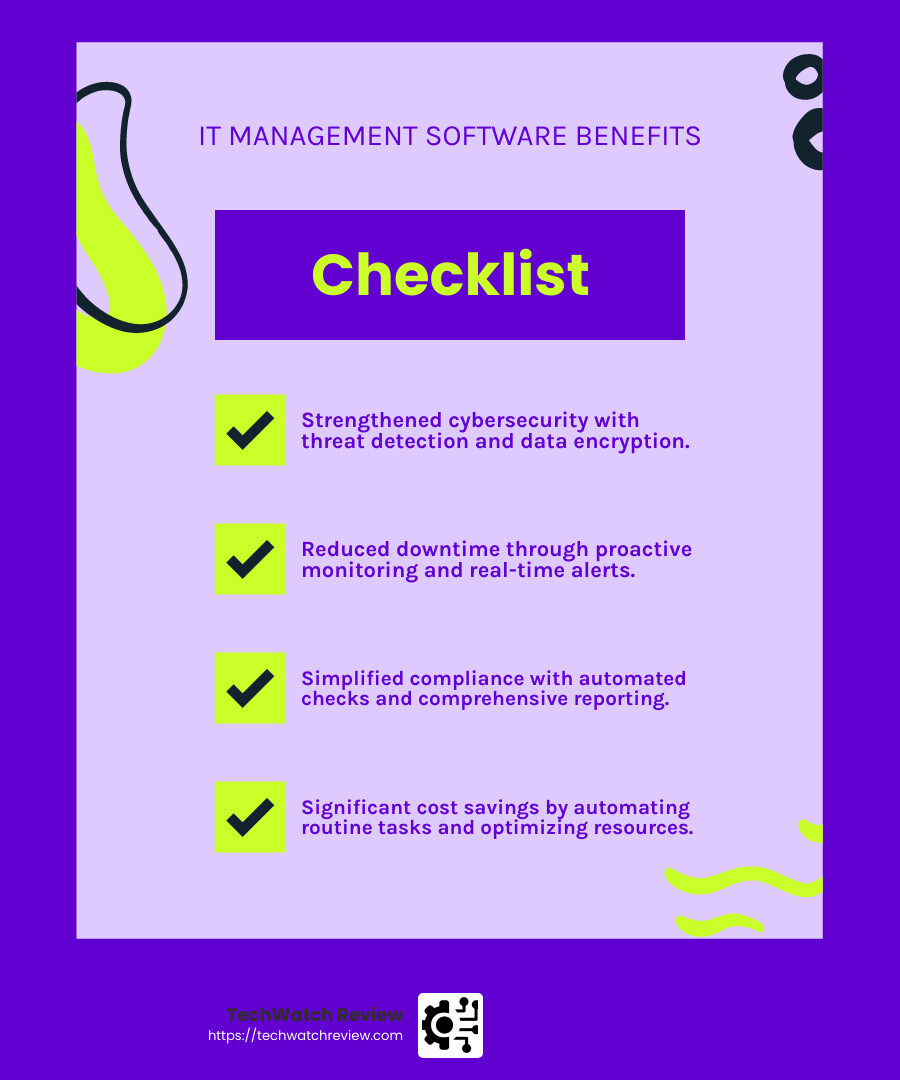
Strengthened Cybersecurity
Security and compliance management features help safeguard data and ensure adherence to regulations. These tools detect and respond to threats, manage access controls, and automate compliance checks.
Example: Oracle Enterprise Manager provides robust security features, including threat detection and data encryption, to protect your IT assets.
Reduced Downtime
Proactive monitoring and real-time alerts help identify and address issues before they cause significant downtime. This ensures that your IT systems remain operational and support business continuity.
Example: New Relic offers real-time performance analytics and automated responses to common issues, minimizing system downtime.
Simplified Compliance
Compliance automation features help you stay ahead of regulatory requirements. These tools perform automated compliance checks, maintain audit trails, and generate necessary reports.
Example: Genuity simplifies compliance with automated checks and comprehensive reporting tools.
Cost Savings
By automating routine tasks and optimizing resource allocation, IT management software can lead to significant cost savings. It reduces the need for manual intervention and minimizes the risk of costly errors.
Example: UpKeep helps businesses manage maintenance and resources efficiently, leading to reduced operational costs.
Improved Productivity
Performance analysis and AI-powered insights help identify bottlenecks and areas for improvement. This leads to improved productivity across the organization.
Example: ServiceNow ITSM leverages AI to provide actionable insights, helping you optimize IT service management and boost overall productivity.
By leveraging these benefits, businesses can ensure a more efficient, secure, and resilient IT environment. Next, let’s explore how IT management software can be particularly beneficial for small businesses.
IT Management Software for Small Businesses
Small businesses often face unique challenges in managing their IT infrastructure. Limited resources and expertise can make IT management feel overwhelming. That’s where tools like Electric come into play.
Electric: Simplifying IT for Small Businesses
Electric is designed to make IT management easy, even if you don’t have a dedicated IT team. Here’s why Electric stands out:
Ease of Use
Electric’s platform is user-friendly and intuitive. You don’t need to be an IT expert to use it. The Electric Desktop App provides a simple interface to monitor and manage your IT systems.
Example: Small businesses can onboard and offboard employees in minutes, ensuring everyone has the right access without needing technical know-how.
Cost Savings
Managing IT can be expensive, but Electric offers significant cost savings. For example, they provide free Mobile Device Management (MDM) software, which helps secure employee devices at no extra cost.
Example: A small business using Electric’s MDM saves thousands of dollars annually compared to traditional MDM solutions.
Integration with HR Systems
Electric integrates seamlessly with HRIS systems. This means employee data is automatically synced, ensuring that access to necessary hardware and software is always up to date.
Example: When a new employee is added to the HR system, Electric automatically provisions their access to the required applications and devices.
Mobile Device Management
With Electric, you can manage all your mobile devices from one platform. This ensures that all devices are secure and compliant with your company’s policies.
Example: If an employee loses their device, Electric allows you to remotely lock or wipe it to protect sensitive information.
Automated Security Protocols
Electric simplifies compliance and security by automating these processes. You can deploy cybersecurity policies and applications directly from the platform.
Example: Electric provides real-time security insights and recommendations, helping small businesses stay compliant with minimal effort.
Why Electric is Ideal for Small Businesses
For small businesses, IT management software like Electric offers a comprehensive solution that is easy to use, cost-effective, and highly secure. It helps you manage IT without needing extensive technical expertise, allowing you to focus on growing your business.
By leveraging Electric, small businesses can ensure their IT infrastructure is efficient, secure, and scalable. Next, let’s address some frequently asked questions about IT management software.
Frequently Asked Questions about IT Management Software
What does IT management do?
IT management involves overseeing and controlling an organization’s technology infrastructure. This includes monitoring systems, administering networks, and ensuring everything runs smoothly. The main goal is to help people work better and more efficiently.
-
Monitoring: IT management software keeps an eye on your systems 24/7. It tracks performance, detects issues early, and alerts the IT team before problems escalate. Tools like New Relic offer real-time insights into server performance and resource utilization.
-
Administration: It handles the setup and maintenance of systems. This includes installing software, managing user accounts, and ensuring compliance with security protocols. For example, Josys excels in unified SaaS and device management.
-
Efficiency: By automating routine tasks, IT management software frees up time for IT teams to focus on strategic initiatives. This boosts productivity and operational efficiency.
What is the difference between MIS and IT management?
MIS (Management Information Systems) and IT management are related but distinct.
-
MIS: Focuses on the collection, processing, and storage of data to support decision-making. It deals with data collection and reporting to help manage business operations.
-
IT Management: Encompasses the broader scope of managing IT infrastructure, including hardware, software, networks, and security. It ensures that all technology resources are used effectively and efficiently.
Which is the best management software?
Choosing the best IT management software depends on your specific needs. Here are some popular options:
-
Zoho Projects: Ideal for project management, offering a range of tools to plan, track, and collaborate on projects.
-
Celoxis: Known for its robust project management features, including resource management and financial tracking.
-
LiquidPlanner: Great for dynamic project management, adapting to changes in real-time.
-
ProofHub: A versatile tool for team collaboration and project management.
-
Redmine: An open-source project management tool, highly customizable and suitable for tech-savvy teams.
-
Smartsheet: Combines project management with powerful spreadsheet capabilities.
-
TeamGantt: Excellent for visual project planning with Gantt charts.
-
Wrike: Offers advanced project management features with strong collaboration tools.
Each of these tools has its strengths, so consider your business needs and workflows when making a choice.
Conclusion
Choosing the right IT management software is crucial for any business. With the IT sector seeing a massive investment of $4.6 trillion this year, it’s clear that companies are prioritizing their tech infrastructure more than ever. The right software will not only safeguard these investments but also improve operational efficiency, security, and scalability.
At TechWatch Review, we aim to help you make informed decisions. We’ve tested over 2,000 tools and written more than 1,000 reviews to guide you through the complex landscape of IT management software.
Here’s a quick recap of what to consider:
- Integration Issues
-
Ensure the software integrates well with your existing systems. Integration problems can be costly and time-consuming to fix.
-
Budget Considerations
-
Look for transparent pricing and avoid hidden fees. Check if the vendor offers bundling options that fit your budget.
-
Customization and Support
-
Some vendors offer extensive customization and global support, which can be a deal-breaker for international businesses.
-
Scalability
-
Your chosen software should grow with your organization. A scalable solution will save you from switching tools down the line.
-
Security
-
Security features are non-negotiable. Look for tools that offer comprehensive security and compliance management.
-
Usability
- A clean, intuitive interface is essential. It should simplify complex operations and be easy for your team to use.
By keeping these factors in mind, you can narrow down your options and select the best IT management software for your needs. For more in-depth insights and comparisons, don’t forget to check our detailed reviews and guides on TechWatch Review.
Choosing the right IT management software can streamline your operations, improve security, and ultimately drive your business forward. Make an informed decision and invest wisely to stay ahead in this tech-driven world.