Table of Contents
- What are No-Code App Development Platforms?
- Top 10 No-Code App Development Platforms in 2026
- 1. Webflow
- 2. Bubble
- 3. Glide
- 4. Adalo
- 5. Thunkable
- 6. Softr
- 7. FlutterFlow
- 8. Voiceflow
- 9. Retool
- 10. AppSheet
- How to Choose the Best No-Code App Development Platform
- Benefits of Using No-Code Platforms
- Frequently Asked Questions about No-Code App Development Platforms
If you’re on the hunt for the best no code app development platform, you’re in the right place.
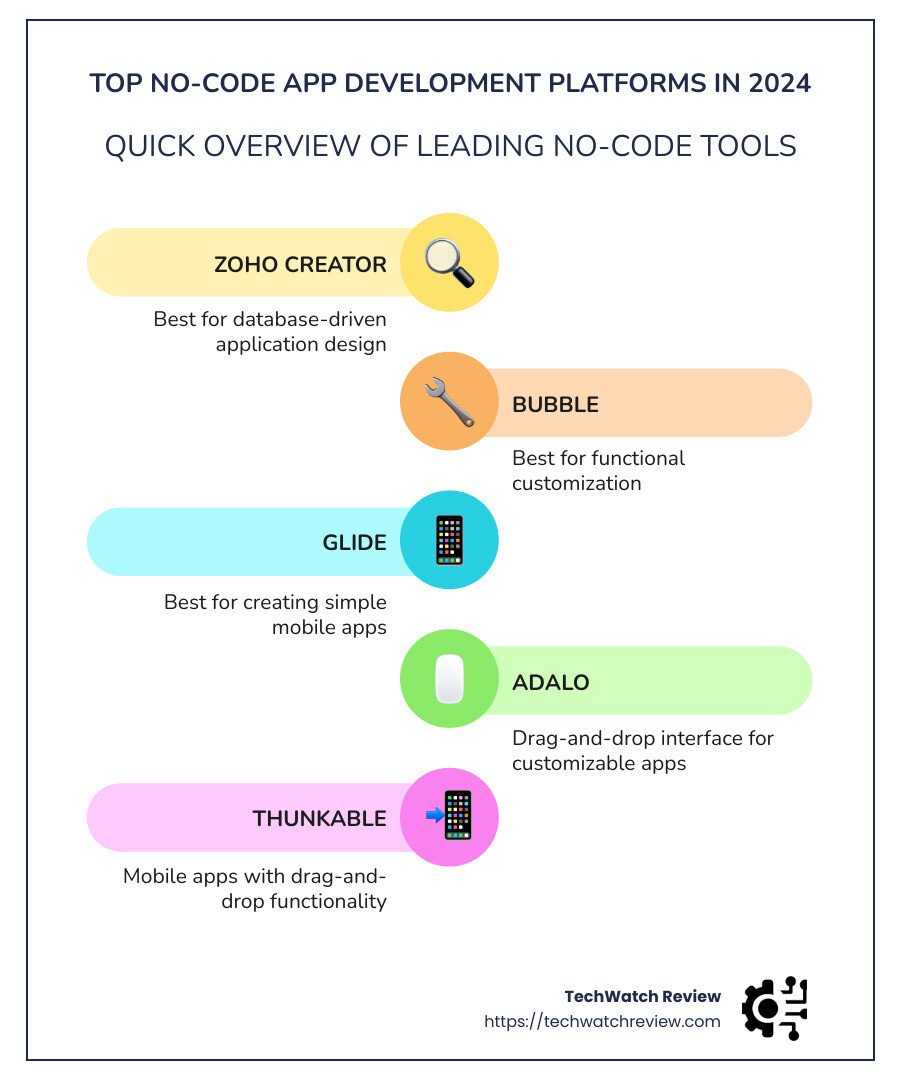
Here’s a quick rundown of the top picks:
- Zoho Creator: Best for database-driven application design
- Bubble: Best for functional customization
- Glide: Best for creating simple mobile apps
No longer do you need to be a coding expert to build an app—no-code tools are changing the game. They enable anyone, from hobbyists to business professionals, to create sophisticated applications without typing a single line of code.
At TechWatch Review, we’ve dug deep to bring you the cream of the crop in no-code app development platforms. This guide is custom for tech-savvy pros like you, who want trusted insights on the top solutions to make your next project a reality.

From simplifying workflows to creating your own SaaS product, these platforms put the power of app development at your fingertips with visual programming and intuitive interfaces. Let’s dive in and find which platform is best for you.
For more insights, check out our articles on no code web apps, free mobile app development software without coding, and low code workflow platform.
What are No-Code App Development Platforms?
No-code app development platforms are tools that let you create applications without writing any code. Instead of typing out complex programming languages, you use graphical user interfaces (GUIs) and drag-and-drop elements to build your app. This makes app development accessible to anyone, even if they have zero programming experience.
Graphical User Interfaces (GUIs)
The magic behind no-code platforms lies in their graphical user interfaces. These GUIs transform the coding process into a visual experience. Think of it like building with Lego blocks. You simply select the components you need—like buttons, forms, and images—and place them where you want.

For example, platforms like Webflow and Bubble use visual components to help you design responsive websites and functional apps. This method makes it easy to see what you’re building in real-time.
Empowering Non-Programmers
Before no-code tools, creating an app meant hiring developers or learning to code yourself. Now, no-code platforms empower non-programmers to bring their ideas to life. Whether you’re a small business owner, a marketer, or a creative professional, you can build apps custom to your needs.
Consider Glide, which lets you turn spreadsheets into mobile apps. If you can manage a spreadsheet, you can create an app.
Real-World Applications
No-code platforms aren’t just for simple projects. Businesses use them to develop complex applications like CRM systems, e-commerce sites, and even internal tools. For instance, Adalo offers customizable drag-and-drop interfaces for building robust applications, while Thunkable focuses on mobile apps with similar ease-of-use.
Case Study: Zoho Creator
One standout is Zoho Creator, known for its database-driven application design. It’s perfect for businesses needing intricate data structures. With Zoho Creator, you can integrate with other Zoho products and external platforms like Salesforce and Slack.

Why It Matters
The rise of no-code platforms democratizes app development. It lowers the barriers, allowing more people to innovate and solve problems through technology. As a result, businesses can quickly adapt to changing needs, save costs on development, and bring products to market faster.
For more insights on how these platforms work, check out our detailed reviews on Bubble, Glide, and Adalo.
Now, let’s dive into the top 10 no-code app development platforms for 2026.
Top 10 No-Code App Development Platforms in 2026
1. Webflow
Webflow is a powerhouse for visual web design. It allows you to create responsive websites without touching a single line of code.
With Webflow, you can start with a variety of templates or build from scratch. Its intuitive visual canvas makes it easy to bring your ideas to life. Whether you’re creating a SaaS website, an e-commerce store, or even a job board, Webflow has you covered.
The platform also offers a low-code option, allowing those with coding skills to further customize their designs. This flexibility makes Webflow a favorite among both beginners and pros.
2. Bubble
Bubble stands out for its ability to create fully functional web applications. It uses visual components to help you build and customize your app.
Bubble offers a drag-and-drop editor that simplifies the development process. You can create everything from simple landing pages to complex SaaS products. The platform also supports integrations with other services, broadening its utility.
3. Glide
Glide is perfect for turning spreadsheets into mobile apps. If you can manage a spreadsheet, you can create an app with Glide.
This platform is ideal for simple mobile applications. It integrates seamlessly with Google Sheets, making it easy to manage your data. Glide is user-friendly and perfect for those who need a quick, functional app without the hassle of coding.
4. Adalo
Adalo offers a drag-and-drop interface for building customizable apps. It’s designed for those who need robust applications but don’t want to code.
Adalo allows you to create both web and mobile apps. You can start with pre-made templates or build from scratch. The platform also supports various integrations, making it versatile for different business needs.
5. Thunkable
Thunkable focuses on mobile app development. It uses a drag-and-drop interface, making it easy to build apps for iOS and Android.
Thunkable is great for those who want to develop mobile apps quickly. You can test your app directly within the platform and publish it to the app stores when ready. It’s perfect for creating anything from simple utility apps to more complex mobile solutions.
6. Softr
Softr is beginner-friendly and integrates seamlessly with Airtable. It’s ideal for those who want to build web apps without any coding.
With Softr, you can create anything from landing pages to full-fledged web applications. Its intuitive interface and Airtable integration make it easy to manage your data and build functional apps.
7. FlutterFlow
FlutterFlow is designed for building native mobile apps. It integrates with Firebase, making it easy to manage back-end services.
FlutterFlow offers a visual interface for designing and building mobile apps. It’s perfect for those who need a native app with real-time data and user authentication features. The platform is user-friendly and ideal for both beginners and advanced users.
8. Voiceflow
Voiceflow is custom for creating conversational AI and voice apps. It’s perfect for building voice-based applications for platforms like Alexa and Google Assistant.
Voiceflow uses a visual interface to design voice interactions. It’s ideal for businesses looking to develop voice apps without coding. The platform supports various integrations, making it versatile for different use cases.
9. Retool
Retool is geared towards building internal tools. It offers a drag-and-drop interface, making it easy to create custom applications for your business needs.
Retool is perfect for businesses that need internal tools to manage operations. It supports various integrations, allowing you to connect with different data sources and APIs. This makes it a powerful tool for creating custom solutions without coding.
10. AppSheet
AppSheet focuses on workflow automation and data capture. It’s ideal for businesses looking to streamline operations without writing code.
AppSheet allows you to create apps that automate workflows and capture data. It integrates with various services like Google Workspace and Microsoft Office, making it easy to manage your data and automate processes.
These platforms are revolutionizing app development, making it accessible to everyone. Whether you’re a small business owner, a marketer, or a creative professional, there’s a no-code platform custom to your needs. For more insights, check out our detailed reviews on Bubble, Glide, and Adalo.
1. Webflow
Webflow is a powerful no-code platform that empowers users to create visually stunning and fully responsive websites without writing a single line of code.
Visual Web Design
Webflow excels in visual web design. It offers a drag-and-drop interface that allows you to design your website visually. You can see your changes in real-time, which makes the design process intuitive and straightforward.
You can start with a variety of templates or build from scratch. Webflow’s Designer tool gives you the freedom to create complex layouts and animations with ease. This makes it a favorite among designers who want complete control over their website’s appearance.
“Webflow gives you the ability to create whatever website you’d like without knowing a single line of code.” – TechWatch Review
Responsive Websites
One of Webflow’s standout features is its ability to create responsive websites. This means your website will look great on any device, whether it’s a desktop, tablet, or smartphone. You can easily adjust the layout and design elements for different screen sizes directly within the platform.
This responsiveness is crucial for modern websites, as it ensures a consistent user experience across all devices. Webflow’s visual canvas makes it simple to tweak and test your design for different screen sizes, ensuring your site is both beautiful and functional.
Integration and Customization
Webflow also supports a wide range of integrations, including popular tools like Mailchimp, Google Sheets, and Slack. This allows you to extend the functionality of your website and connect it with other tools you use.
For those with some coding knowledge, Webflow offers the option to dive into the code behind the design. This makes it a versatile platform for both beginners and advanced users.
“Webflow allows full customization, and if you happen to have some coding skills, you can always take a peek at the code behind the design.” – TechWatch Review
Cost and Accessibility
For startups and small businesses, budget is often a concern. Webflow provides an affordable entry point, allowing you to create high-quality websites without a significant investment.
Pros:
- Wide range of integrations
- E-commerce capabilities
- Visually driven design interface
Cons:
- Higher cost compared to some other no-code solutions
- Custom domain settings and some advanced features can be intricate
- Learning curve for complete beginners
If you’re looking for a platform that combines visual web design with powerful customization options, Webflow is a top choice. It’s perfect for creating professional, responsive websites that stand out.
2. Bubble
Bubble is a standout in the no-code development space, offering an incredible balance between power and ease of use. It’s designed for those who want to create complex web applications without needing to write a single line of code.
Visual Components
At the heart of Bubble is its visual programming interface. You build your app by dragging and dropping elements onto a canvas, much like using design tools like Canva. This makes it accessible for beginners who may not have any coding experience.
For example, you can create a user registration form by simply dragging input fields and buttons onto your page. Bubble’s editor is intuitive and lets you see your changes in real-time. This visual approach makes it easier to understand how your app will look and function, which can be a huge confidence booster for new developers.
Functional Customization
One of Bubble’s greatest strengths is its functional customization. You’re not just limited to basic templates; you can tailor every aspect of your app to fit your specific needs.
Bubble allows you to set up complex workflows and logic without any coding. For instance, you can define what happens when a user clicks a button—whether it’s sending an email, updating a database, or redirecting to another page. This flexibility is why some no-code agencies rely exclusively on Bubble to build apps for their clients.
“Bubble lets you build fully functioning end products with an abundance of options for functional customization.” – TechWatch Review
Community and Learning Resources
The Bubble community is vibrant and incredibly supportive. There are numerous forums, YouTube tutorials, and written guides available to help you overcome any roadblocks you might encounter.
Bubble also offers the Bubble Academy and a three-hour crash course to get you started quickly. If you want to learn faster, you can hire a coach or enroll in a development bootcamp.
“One of Bubble’s greatest advantages is that the community is active, with plenty of help to get started.” – TechWatch Review
Pricing
Bubble offers a free plan to get you started, with paid plans starting at $32/month. Its workload-based pricing model ensures you only pay for what you use, making it a cost-effective solution for startups and small businesses.
Pros:
- Extensive customization options
- Active and supportive community
- Free and affordable paid plans
Cons:
- Steeper learning curve for complete beginners
- Workload-based pricing can be complex to understand initially
If you’re looking for a platform that provides both the power to create complex applications and the ease of a visual interface, Bubble is a fantastic choice. It’s perfect for those who want to build scalable, fully-fledged products.
3. Glide
Glide is an ideal choice for creating simple mobile apps quickly, especially if you have basic spreadsheet skills. This no-code platform transforms your data from sources like Google Sheets or Excel files into powerful, progressive web applications.
Simple Mobile Apps
Glide stands out for its ability to create mobile apps that are not only functional but also visually appealing. The platform uses a drag-and-drop interface, making it accessible to users with zero coding experience. You can easily add visual components like buttons, images, and text fields to your app, allowing you to build anything from an employee directory to a sales pipeline monitor.
“Glide is a great way to create mobile apps for specific internal business processes.” – TechWatch Review
Spreadsheet Integration
One of Glide’s most compelling features is its seamless integration with spreadsheets. By pulling data directly from Google Sheets or Excel files, Glide allows you to leverage your existing data structures. This makes it incredibly easy to turn a simple spreadsheet into a fully functional mobile app.
For example, imagine you have an inventory management spreadsheet. With Glide, you can turn that spreadsheet into an app that tracks stock levels, updates automatically, and even sends notifications when items run low. This kind of automation can save you a lot of time and reduce manual errors.
“Glide transforms your spreadsheets into powerful web apps. Ideal for business tools like inventory management or sales pipelines.” – TechWatch Review
Use Cases and Integrations
Glide is particularly well-suited for creating apps that serve specific business needs. Whether you need an app for managing inventory, monitoring sales, or maintaining an employee directory, Glide has you covered. Its integration with Zapier further improves its capabilities, allowing you to set up advanced workflows and automate tasks across different platforms.
For instance, you can trigger a workflow in Zapier to send an email notification whenever a new entry is added to your Glide app. This level of automation can significantly streamline your business processes.
Learning Resources
If you’re new to no-code development, Glide offers extensive learning resources through Glide University. This platform provides a variety of high-quality videos that focus on getting started and best practices, helping you become proficient in no time.
“Glide University is one of the best learning resources I encountered in this category.” – TechWatch Review
Pricing
Glide offers a free plan for individuals, making it easy to get started without any financial commitment. Paid plans start at $25/month, providing additional features and capabilities custom to business needs.
Pros:
- User-friendly drag-and-drop interface
- Seamless spreadsheet integration
- Extensive learning resources
Cons:
- Limited UI customization
- Advanced functionalities may require additional tools like Zapier
If you’re looking for an easy way to transform your spreadsheets into functional mobile apps, Glide is definitely worth considering. Its simplicity and powerful integrations make it one of the best no-code app development platforms available.
4. Adalo
Adalo is a top choice for creating customizable web and mobile apps without writing a single line of code. It stands out for its intuitive drag-and-drop interface and robust set of features, making it accessible for beginners and powerful enough for advanced users.
Customizable Apps
Adalo excels in allowing users to build highly customizable apps. With Adalo, you can create apps custom to your specific needs, whether it’s for e-commerce, social networking, or internal business tools. The platform offers a wide range of pre-built templates and components, such as buttons, forms, and lists, which you can easily modify to suit your requirements.
“Adalo’s flexibility in customizing apps allows users to bring their unique ideas to life without any coding.” – TechWatch Review
Drag-and-Drop Interface
One of Adalo’s standout features is its drag-and-drop interface. This user-friendly design tool makes it simple to add and arrange elements within your app. You can effortlessly drag components like text boxes, images, and buttons onto your app’s canvas and customize them to fit your vision.
Here’s how it works:
- Select a Component: Choose from a library of pre-built components.
- Drag and Drop: Place the component onto your app’s canvas.
- Customize: Adjust the properties, such as color, size, and functionality, to match your needs.
This intuitive process ensures that even those with no technical background can build functional and visually appealing apps.
Publishing and Integration
Adalo makes it easy to publish your app directly to the Apple App Store, Google Play Store, or the web. This one-click deployment feature speeds up the time-to-market for your app, allowing you to reach your audience quickly.
Additionally, Adalo supports integrations with various third-party services, enhancing your app’s functionality. For example, you can connect your app to Zapier to automate workflows, or integrate with Stripe for seamless payment processing.
Use Cases
Adalo is versatile, catering to a variety of use cases:
- E-commerce: Create a custom online store with product listings, shopping carts, and payment gateways.
- Social Networking: Build social apps with user profiles, messaging, and activity feeds.
- Business Tools: Develop internal tools like project management apps, employee directories, or CRM systems.
Learning Resources
Adalo offers comprehensive learning resources, including tutorials, webinars, and a supportive community forum. These resources help users of all skill levels get the most out of the platform.
“Adalo’s learning resources are invaluable for anyone new to no-code development.” – TechWatch Review
Pricing
Adalo provides a free plan that includes basic features, making it accessible for anyone to start building apps. Paid plans start at $50/month, offering additional features such as custom domains and increased storage.
Pros:
- Highly customizable app creation
- User-friendly drag-and-drop interface
- One-click deployment to app stores
Cons:
- Some advanced features may require a learning curve
- Premium features can be costly for small projects
If you’re looking for a platform to create interactive and customizable apps with ease, Adalo is a great option. Its blend of simplicity and power makes it one of the best no-code app development platforms available.
Learn more about Adalo
5. Thunkable
Thunkable is a standout in no-code platforms, especially for those focused on building mobile apps. Like Adalo, Thunkable uses a drag-and-drop interface, making it accessible to everyone, even those with no coding experience.
Mobile Apps
Thunkable is designed to help you create fully functional mobile apps for both iOS and Android. The platform supports native mobile features such as push notifications, GPS, and Bluetooth, allowing you to build apps that take full advantage of mobile device capabilities.
Drag-and-Drop Interface
The drag-and-drop interface is at the heart of Thunkable’s appeal. Here’s how it works:
- Choose Components: Select from a comprehensive library of pre-built components such as buttons, text fields, and maps.
- Drag and Drop: Place these components onto your app’s canvas.
- Customize: Adjust properties like size, color, and functionality to suit your needs.
This intuitive process makes it easy for anyone to build complex, feature-rich apps without writing a single line of code.
Real-Time Preview
One of Thunkable’s standout features is the ability to preview changes in real-time. The Thunkable Live companion app allows you to see your app’s behavior instantly on your mobile device as you build it. This feature speeds up the development process and helps you catch any issues early on.
Pre-Built Components
Thunkable offers a wide range of pre-built components to help you get started quickly. These include:
- Input Fields: For collecting user data.
- Buttons: For triggering actions.
- Maps: For location-based services.
- Video Players: For multimedia content.
These components can be customized and combined to create a unique user experience.
Logic Blocks
Thunkable also uses a block-based coding system to add functionality to your app. This visual programming approach makes it easy to set up complex logic without needing to understand traditional coding. You can create navigation flows, integrate APIs, and set up conditional actions just by snapping blocks together.
Publishing
Thunkable simplifies the publishing process. Once your app is ready, you can publish it directly to the Apple App Store and Google Play Store. This seamless deployment helps you get your app to users quickly.
Use Cases
Thunkable is versatile and can be used for a variety of applications:
- Education: Create educational apps that include quizzes, interactive lessons, and more.
- Business: Develop internal tools like employee directories, task managers, and CRM systems.
- Entertainment: Build games, multimedia apps, and social networking platforms.
Learning Resources
Thunkable offers extensive learning resources, including tutorials, guides, and a community forum. These resources are invaluable for both beginners and advanced users.
“Thunkable’s learning resources make it easy for anyone to start building mobile apps.” – TechWatch Review
Pricing
Thunkable offers a free plan that includes basic features, making it accessible for anyone to start building apps. Paid plans start at $15/month, providing additional features like custom domains and increased storage.
Pros:
- Extensive component library
- Real-time preview with Thunkable Live
- Supports both iOS and Android app development
Cons:
- Some advanced features may require a learning curve
- Premium features can be costly for small projects
If you’re looking for a no-code platform specifically for mobile app development, Thunkable is a top choice. Its drag-and-drop interface and real-time preview capabilities make it one of the best no-code app development platforms available.
Explore other no-code platforms
6. Softr
Softr is an excellent no-code platform for beginners looking to create web apps quickly and efficiently. Designed with simplicity in mind, Softr allows you to build functional web apps by connecting to your Airtable data, making it a go-to choice for those new to app development.
Beginner-Friendly
One of Softr’s standout features is its beginner-friendly interface. The platform is designed to be intuitive, so you don’t need any prior coding knowledge to get started. Here’s how it works:
- Templates: Softr offers a variety of pre-built templates for different types of apps, from CRMs to job boards.
- Drag-and-Drop: You can easily add and arrange blocks (both static and dynamic) on a canvas to build your app.
- Customization: Each block can be customized for content, layout, and interactivity.
This straightforward approach helps you create professional-looking apps without diving into complex documentation.
Airtable Integration
Another major advantage of Softr is its seamless Airtable integration. Airtable is a powerful database tool that combines the simplicity of a spreadsheet with the power of a database. Softr allows you to connect your Airtable data to your app easily. Here’s how:
- Connect Airtable: Link your Airtable account to Softr.
- Dynamic Blocks: Use dynamic blocks to display data from Airtable in real-time.
- Data Management: Manage your app’s data directly from Airtable, making it easier to update and maintain.
This integration is particularly useful for creating membership sites, directories, or any app that relies on dynamic data.
Key Features
- Ease of Use: Softr’s interface is designed to be as simple as possible, making it ideal for beginners.
- Templates: Start with pre-built templates to fast-track your app development.
- Responsive Design: Ensure your app looks great on desktops, tablets, and smartphones.
- User Management: Easily manage users and roles within your app.
- Zapier Integration: Automate workflows by connecting Softr to other apps using Zapier.
Pricing
Softr offers a free plan, which is perfect for getting started. For more advanced features, paid plans start at $29/month.
Pros:
- Extremely beginner-friendly
- Seamless Airtable integration
- Wide range of templates
Cons:
- Limited advanced logic capabilities
- Some templates require Airtable, which may limit initial flexibility
If you’re a beginner looking to build a functional web app quickly, Softr is a fantastic choice. Its intuitive interface and strong Airtable integration make it one of the best no-code app development platforms for newcomers.
7. FlutterFlow
FlutterFlow is a robust no-code platform designed to create native mobile apps for multiple platforms, including iOS, Android, and even web apps. Built on Google’s open-source Flutter framework, FlutterFlow offers deep control over design and functionality, making it a powerful tool for both beginners and experienced developers.
Native Mobile Apps
FlutterFlow stands out for its ability to create native mobile apps. This means the apps you build will run smoothly on both iOS and Android devices, providing a seamless user experience. Here’s what makes it special:
- Cross-Platform Development: Write once, deploy everywhere. Your app will run on multiple platforms without needing significant changes.
- High Performance: Native apps built with FlutterFlow are optimized for speed and reliability.
- Rich UI Components: Access a wide range of pre-built UI components to design visually appealing and interactive apps.
Firebase Integration
One of FlutterFlow’s key features is its integration with Firebase, Google’s backend-as-a-service platform. This integration allows you to add powerful backend functionalities to your app without writing any code. Here’s how it works:
- Real-Time Databases: Use Firebase’s real-time database to store and sync data across all clients in real-time.
- Authentication: Implement secure user authentication with Firebase Auth, supporting email/password, Google, Facebook, and more.
- Cloud Firestore: Leverage Cloud Firestore for scalable, flexible databases that support complex queries.
This integration streamlines the process of adding backend features, making it easier for you to focus on the front-end design and user experience.
Key Features
- Drag-and-Drop Interface: Easily design your app’s UI with a simple drag-and-drop editor.
- Code Export: With one click, export your app’s code to further customize it or deploy it directly.
- AI-Powered Design: Use AI to generate screens based on your prompts, speeding up the design process.
- Custom Widgets: Create and reuse custom widgets to maintain consistency across your app.
- API Integrations: Connect to any REST API to fetch and display data in your app.
Pricing
FlutterFlow offers a free plan to get started, with paid plans starting at $30/month for more advanced features and capabilities.
Pros:
- Deep control over design and functionality
- Fully extensible with code for advanced customization
- Cross-platform support
Cons:
- Steep learning curve
- Prefers Firebase as a data source, which may be complex for beginners
If you’re looking to build a powerful, native mobile app with extensive customization options, FlutterFlow is an excellent choice. Its robust feature set and deep integration with Firebase make it one of the best no-code app development platforms available.
Explore other no-code platforms to find the best fit for your project.
8. Voiceflow
Voiceflow is a top choice for creating conversational AI and voice apps. This no-code platform makes it possible for anyone to design, measure, and refine voice and chat applications without writing a single line of code.
Conversational AI
Voiceflow simplifies the process of building conversational AI. Whether you want to create a voice assistant, chatbot, or any other conversational interface, Voiceflow provides the tools to do it.
- User-Friendly Interface: The drag-and-drop interface allows you to create complex conversational flows easily.
- Pre-Built Components: Use pre-built blocks for common tasks like handling inputs, generating responses, and managing dialogue.
- Testing and Iteration: Test your conversational AI in real-time and make adjustments on the fly.
Voice Apps
Voiceflow excels at building voice apps for platforms like Google Assistant, Amazon Alexa, and more. Here’s what makes it stand out:
- Cross-Platform Compatibility: Design once and deploy across multiple voice platforms.
- Interactive Prototypes: Create high-fidelity prototypes that you can interact with, ensuring your voice app meets user expectations.
- API Integrations: Easily integrate with third-party APIs to add functionalities like weather updates, news, and more.
Key Features
- Drag-and-Drop Builder: Easily design conversational flows with a simple drag-and-drop editor.
- Real-Time Collaboration: Work with your team in real-time, making it easier to share ideas and iterate quickly.
- Analytics and Metrics: Measure the performance of your voice app with built-in analytics tools.
- Customizable Dialogues: Tailor dialogues to fit your specific use case, ensuring a natural and intuitive user experience.
- One-Click Publishing: Publish your voice app to platforms like Alexa and Google Assistant with a single click.
Pricing
Voiceflow offers a free Sandbox plan to get started, with paid plans like Professional at $50/month and custom pricing for Teams and Enterprise solutions.
Pros:
- Simplifies the creation of conversational AI and voice apps.
- User-friendly interface with drag-and-drop functionality.
- Real-time testing and iteration capabilities.
Cons:
- Can be challenging for average users to learn initially.
- Limited to voice and conversational interfaces, unlike more versatile no-code platforms.
Voiceflow is ideal for those looking to create sophisticated conversational AI and voice apps without needing to dive into complex coding. Its intuitive interface and robust features make it one of the best no-code app development platforms for voice technology.
For more insights on no-code platforms, check out our article on Top No-Code Platforms for 2023.
9. Retool
Retool is a powerful no-code platform designed for building internal tools. Its drag-and-drop interface and pre-built components make it easy to create custom applications for managing data, automating workflows, and more.
Internal Tools
Retool shines when it comes to building internal tools. Whether you need a dashboard, admin panel, or a custom CRM, Retool provides the flexibility and power to get the job done.
- Data Management: Easily connect to databases like PostgreSQL, MySQL, and MongoDB to manage and visualize data.
- Workflow Automation: Automate repetitive tasks such as data entry, reporting, and notifications.
- Custom Interfaces: Build interfaces custom to your specific business needs, from simple forms to complex dashboards.
Drag-and-Drop Interface
Retool’s drag-and-drop interface allows you to create applications quickly without writing code. Here’s how it works:
- Pre-Built Components: Use components like tables, forms, buttons, and charts to build your app.
- Custom Queries: Write SQL, JavaScript, or REST API queries to fetch and manipulate data.
- Event Handlers: Set up event handlers to define what happens when users interact with your app (e.g., clicking a button).
Key Features
- Drag-and-Drop Builder: Create custom internal tools with a simple drag-and-drop editor.
- Data Integrations: Connect to various data sources like SQL databases, APIs, and Google Sheets.
- Role-Based Access Control: Secure your applications with built-in authentication and authorization.
- Real-Time Collaboration: Work with your team in real-time to build and iterate on tools.
- Customizable UI: Tailor the user interface to match your brand and specific requirements.
- Deployment Options: Deploy your applications on cloud platforms like AWS and Google Cloud, or on-premises.
Pricing
Retool offers a Free plan with up to 500 workflow runs per month. Paid plans include the Team plan at $10/month per standard user, the Business plan at $50/month per standard user, and custom pricing for Enterprise solutions.
User Ratings
Retool is highly rated for its user-friendly interface, customization options, and excellent customer support. However, some users find the pricing high and the interface complex for beginners.
Pros:
- Easy to use drag-and-drop interface.
- Extensive data integration options.
- Strong security features with role-based access control.
Cons:
- High pricing for larger teams.
- Can be complex for new users.
Retool is perfect for businesses looking to build powerful internal tools quickly. Its flexibility and robust features make it one of the best no-code app development platforms for creating custom business applications.
Next, let’s explore how to choose the best no-code app development platform for your specific needs.
10. AppSheet
AppSheet is a top choice for those looking to automate workflows and capture data without writing any code. It’s part of the Google ecosystem, making it easy to integrate with tools you probably already use, like Google Sheets and Excel.
Workflow Automation
AppSheet excels at workflow automation. It allows businesses to streamline tasks and automate repetitive processes, saving time and reducing errors.
- Task Automation: Automate routine tasks such as sending emails, updating spreadsheets, or generating reports.
- Approval Workflows: Create multi-step approval workflows to ensure that tasks are completed in sequence and approved by the right people.
- Notifications: Set up automated notifications to keep your team informed about important updates and changes.
Data Capture
AppSheet makes data capture simple and efficient. You can create custom forms and capture data in real-time.
- Custom Forms: Design forms to capture data exactly how you need it. Add fields for text, numbers, dates, images, and more.
- Real-Time Sync: Data captured through AppSheet apps syncs in real-time with your data sources, ensuring everyone has the most up-to-date information.
- Offline Capability: Capture data even when offline. Once back online, the data will sync automatically.
Key Features
- Drag-and-Drop Builder: Create apps with an intuitive drag-and-drop editor.
- Data Integrations: Connect to Google Sheets, Excel, Salesforce, and more.
- AI Integration: Use AI to automate tasks and improve efficiency.
- Secure Sign-In: Ensure your data is protected with secure sign-in options.
- Team Management: Manage user access and roles to keep your team organized.
Pricing
AppSheet offers several pricing tiers:
- Starter: $5 per user/month, includes basic application features.
- Core: $10 per user/month, adds more advanced features and integrations.
- Enterprise Standard: Custom pricing for larger organizations.
- Enterprise Plus: Custom pricing with additional features and support.
User Ratings
AppSheet is highly rated for its affordability, ease of use, and powerful data management capabilities. Users appreciate the real-time data sync and the ability to create custom forms easily. However, there is a learning curve, especially for absolute beginners.
Pros:
- Affordable pricing options.
- Powerful workflow automation and data capture features.
- Seamless integration with Google services.
Cons:
- Some advanced features may require additional costs.
- Learning curve for new users.
AppSheet is an excellent choice for businesses looking to automate workflows and capture data efficiently. Its integration with Google services and user-friendly interface make it one of the best no-code app development platforms available.
For more insights on no-code platforms, check out our article on Top No-Code Platforms for 2023.
How to Choose the Best No-Code App Development Platform
Choosing the best no-code app development platform can seem overwhelming. Here’s a simple guide to help you decide based on your project requirements, business needs, and user preferences.
Project Requirements
Start by defining your project requirements. Ask yourself:
- What type of app are you building? (e.g., mobile, web, internal tool)
- Do you need specific features like workflow automation, data capture, or AI integration?
- How complex is your app? Do you need advanced logic or simple functionalities?
For instance, if you’re building a mobile app, Thunkable or FlutterFlow might be your best bet. If you need a web app with a focus on design, consider Webflow.
Business Needs
Consider the unique needs of your business:
- Budget: How much can you spend on the platform? Platforms like Softr and Glide offer affordable options, while enterprise solutions like OutSystems might be pricier.
- Scalability: Will the platform grow with your business? Look for platforms with robust scalability options, such as Bubble.
- Integrations: Do you need to integrate with other tools? AppSheet integrates seamlessly with Google services, making it ideal for businesses already using these tools.
User Preferences
Finally, think about who will be using the platform:
- Technical Skills: How tech-savvy are your users? Platforms like Softr are beginner-friendly, while Backendless offers more control for advanced users.
- Ease of Use: Do you prefer a drag-and-drop interface or more customization? Adalo offers a straightforward drag-and-drop interface, whereas Retool provides more flexibility for custom internal tools.
- Support and Community: Is there a strong support system or community? Platforms with active user communities and comprehensive support can make a big difference in your development experience.
By evaluating these factors, you can choose the best no-code app development platform that aligns with your goals and resources. Whether you’re a beginner or a seasoned developer, there’s a platform out there to help you bring your app to life.
Next, let’s dive into the benefits of using no-code platforms.
Benefits of Using No-Code Platforms
No-code platforms are revolutionizing app development, making it accessible to everyone, regardless of technical skills. Here are the key benefits:
Speed
One of the biggest advantages of no-code platforms is speed. Traditional coding can take months or even years to complete an app. With no-code tools, you can build functional apps in days or even hours.
Case in Point: A small retail business used Adalo to create a mobile app for customer engagement. What would have taken six months with traditional coding was completed in just two weeks. This rapid development cycle allows businesses to quickly adapt to market changes and customer needs.
Cost-Efficiency
No-code platforms are cost-effective. Hiring skilled developers can be expensive, but no-code tools eliminate this need. You can create professional-grade apps without breaking the bank.
Example: A startup used Thunkable to develop their app. Instead of spending thousands on developers, they used the platform’s drag-and-drop interface and saved significant costs. This makes no-code platforms ideal for small businesses and startups with limited budgets.
Accessibility
No-code platforms democratize app development by making it accessible to everyone. Whether you’re a marketer, designer, or entrepreneur, you can bring your ideas to life without needing to learn complex programming languages.
Quote: “You don’t build it for yourself. You know what the people want and you build it for them.” – Walt Disney. This accessibility means that even those without technical backgrounds can participate actively in the digital change process.
Democratization of Technology
The democratization of technology is perhaps the most transformative benefit. By lowering the barriers to entry, no-code tools empower underrepresented groups and individuals to create and innovate. This leads to a more diverse range of apps and solutions that better reflect the needs and experiences of different communities.
Statistic: According to a Zapier report, the number of no-code users is expected to grow by 40% until 2025. This growth highlights the increasing accessibility and popularity of no-code platforms.
By leveraging the speed, cost-efficiency, and accessibility of no-code platforms, businesses can innovate faster and more inclusively than ever before. Next, let’s address some frequently asked questions about no-code app development platforms.
Frequently Asked Questions about No-Code App Development Platforms
Can I build an app without coding?
Absolutely! You can build an app without writing a single line of code. No-code app builders like Softr, Bubble, and Glide make it possible. These platforms offer pre-programmed templates and drag-and-drop interfaces, allowing you to customize your app easily.
For example, Softr is great for beginners. It integrates seamlessly with Airtable, turning your spreadsheets into fully functional apps. On the other hand, Bubble offers more advanced customization, making it suitable for more complex projects.
Which is the best app maker without coding?
The best no-code app maker depends on your specific needs:
- Softr: Best for complete beginners, especially those familiar with Airtable.
- Bubble: Offers a balance between power and ease of use, suitable for more complex apps.
- Glide: Ideal for creating simple mobile apps using Google Sheets.
- Draftbit: Perfect for building powerful mobile apps with advanced features.
- Zapier Interfaces: Focuses on automation, connecting different apps together.
- Bildr: Known for its flexibility and customization options.
- Backendless: Provides advanced control over your data and infrastructure.
What is the most popular no-code platform?
Several no-code platforms stand out due to their popularity and user base:
- Webflow: Known for visual web design and building responsive websites.
- Bubble: Renowned for its powerful customization and functional components.
- Airtable: A favorite for its spreadsheet-like interface and versatility.
- FlutterFlow: Popular for building native mobile apps with Firebase integration.
- Adalo: Loved for its user-friendly drag-and-drop interface.
- Quickbase: Widely used for creating internal tools and business apps.
- Thunkable: Great for building mobile apps without coding.
Statistic: According to Gartner, platforms like Webflow and Bubble are frequently reviewed and highly rated by users, reflecting their popularity and reliability.
By choosing the right no-code platform, you can bring your app ideas to life quickly and efficiently.
At TechWatch Review, we believe that the future of app development is bright, thanks to no-code platforms. These tools are revolutionizing the way we create digital solutions, making it possible for anyone with a vision to build functional, beautiful apps without needing to write a single line of code.
Empowering Innovation
No-code platforms democratize app development, allowing non-technical users to participate in the digital change. This shift is not just empowering individuals but also driving innovation across industries. For instance, small business owners can now create custom apps custom to their needs, while large enterprises can streamline internal processes with bespoke solutions.
Informed Decisions
Our goal at TechWatch Review is to provide you with the insights and information you need to make informed decisions. Whether you’re a startup looking for cost-effective development tools or an enterprise seeking scalable solutions, our comprehensive reviews and expert analyses are here to guide you.
The No-Code Revolution
The no-code movement is here to stay. As these platforms continue to evolve, we can expect more advanced features, better integrations, and increased support for complex applications. The lines between low-code and no-code are blurring, offering users more flexibility and power.
For more insights and updates on no-code platforms, visit TechWatch Review.